Fix the Solid Yellow Light: Step-by-Step Verizon Router Setup and Led Status Guide
 By Marcus Vance
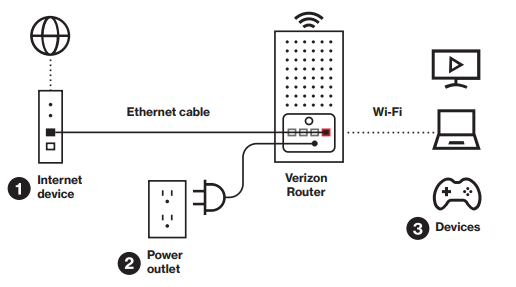
If you face a solid yellow ring, skip the urge to repeatedly press the pinhole reset button. Factory resets during an unprovisioned state can corrupt configuration files and prolong setup. Follow this systematic physical and sequential recovery routine instead.
First, trace the Ethernet cable from the router back to your Optical Network Terminal. The ONT is typically mounted in a garage, basement, or utility closet. Look at the diagnostic LEDs on the ONT faceplate. You should see solid green lights next to PWR (Power), BAT (Battery), and NTWK (Network). If the FAIL or MGMT lights glow red, the fiber connection entering your house is physically severed or unprovisioned at the street-level junction box. In that situation, no amount of router adjustment will restore service.
If the ONT LEDs are healthy green, execute a structured router power cycle reset. Pull the power plugs from both the ONT and the router. Wait a full two minutes to allow internal capacitors to drain and force network lease drops on the central office switch. Plug the ONT back into electrical power first. Allow its internal processors three full minutes to establish optical alignment until the DATA or LINK light blinks steadily.
Only after the ONT reports stable optical alignment should you reconnect the router power cable. Watch the ring light boot from cold. It will flicker white, display temporary amber, and then, once the WAN handshake completes, switch cleanly to solid white. If it returns to yellow, verify that your Cat6 patch cable clicks firmly into both RJ45 jacks; bent retaining clips frequently cause partial pin contact that drops the link speed to zero.
Marcus Vance is a cybersecurity auditor and technology writer dedicated to educating the public about online safety, data privacy regulations, enterprise security, and emerging cyber threats.
